
At about one in the morning last Saturday, I asked Puck for help with a small annoyance.
I had an app on my Mac, ClaUse Bar, that showed me my Claude usage. It was limited, and Claude is only part of what I pay for. I have more than one Claude subscription, plus Codex, Amp, GitHub Copilot and a Google account I use through Antigravity: six accounts across five providers. I wanted to see all of them in one place.
By Sunday night I had a Mac app called AI Usage, signed, notarised and downloadable from ai.rocketstack.co, that keeps itself up to date. Since Monday there’s a Windows version too.
Why I Care How Much I’ve Used
I use my Claude accounts as additional tokens. I don’t care which one I’m using, but I care how much I’ve used. When an agent stops halfway through a task because a limit has run out, the answer is to carry on with the account that has the most left, and to do that I have to know which one it is.
Every provider counts differently, which is why no single provider’s page helps. Claude has a weekly limit, plus a five-hour one on every plan except Ultra, which Anthropic dropped it from at the end of October. Codex has a five-hour window and a weekly one. Antigravity counts its Gemini models separately from the Claude and GPT models it also offers. Copilot counts premium requests per month. Amp counts agent usage in dollars and orb time in hours, and since I moved into Amp that’s where a lot of my work runs.
What Was Already Out There
The research came back with a long list. The best of it by far was CodexBar, Peter Steinberger’s free, open source menu bar app, which already covers far more providers than I’ll ever use, several accounts each. The recommendation was to try it for a day before building anything.
So I tried it. It does a huge amount, but I didn’t find it overly intuitive, and adding another subscription should be the most obvious thing in the app.
The paid apps I looked at either covered one or two providers or didn’t list Amp at all. So I asked Amp for a native menu bar app instead.
What It Shows
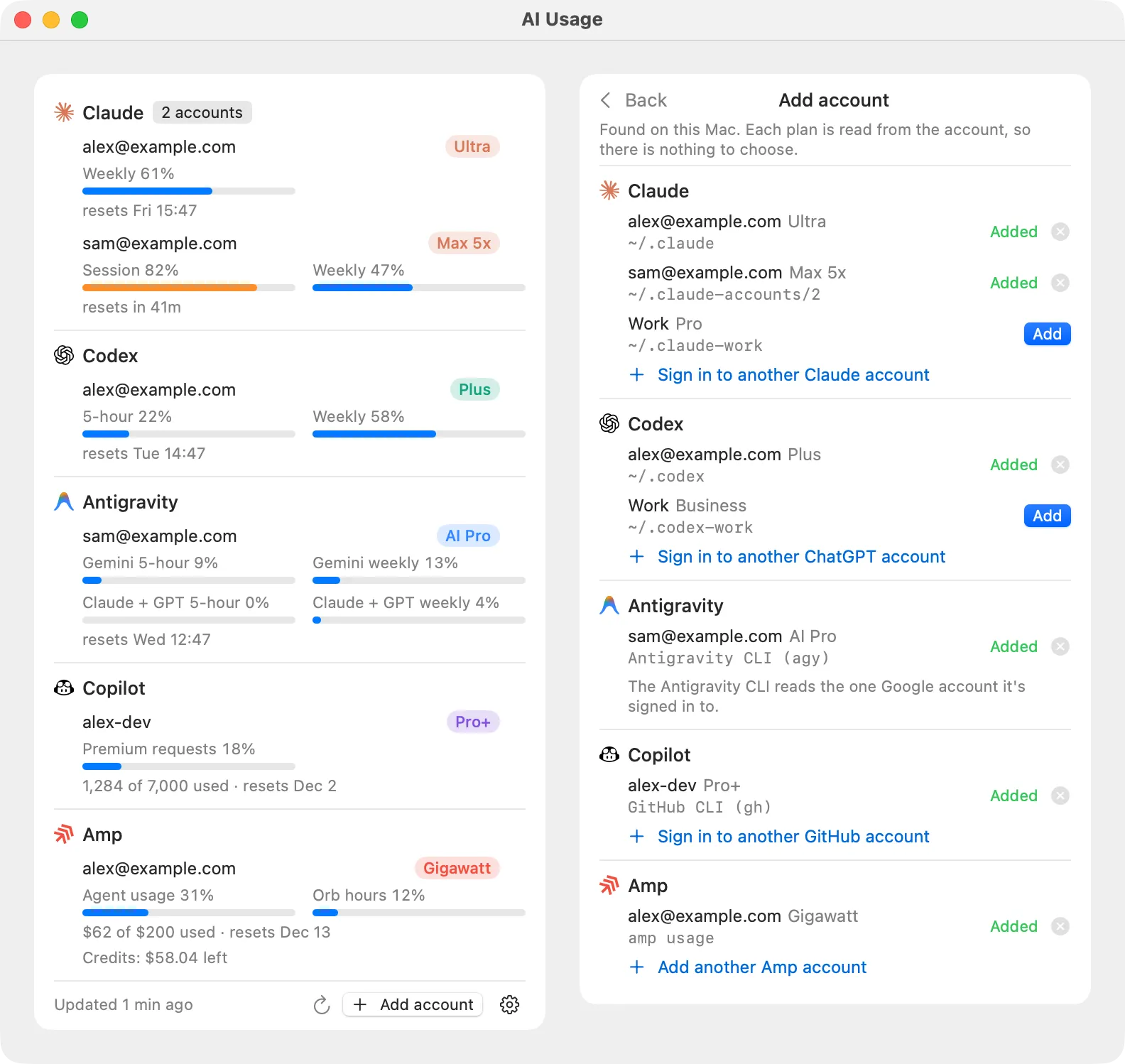
Every subscription gets its own row, with its plan in a pill in the provider’s colour and a bar for each limit it has, with when it resets.
The first version was built in the early hours and running on my Mac by breakfast. The setup was amazing: it just found all my accounts, automagically. It reads the sign-ins the command line tools already have:
- each Claude Code config folder is an account, with its own sign-in in the macOS Keychain;
- each Codex home folder is an account, read through Codex’s own app server;
- Antigravity comes from its CLI,
agy; - every GitHub account signed in to
ghshows up for Copilot; - Amp comes from
amp usage, or an access token for an extra account.
Nothing goes anywhere except to each provider, to ask for my usage. There’s no server and no analytics.
My first round of notes was short: let me remove an account I don’t want to see, stop cutting off long account names, stop Antigravity repeating its bars, and give it an icon. All four were fixed within the hour.
Three Rings
Once the menu worked, I wanted to know how close I was without opening it. The app icon is three rings, so I asked whether the icon itself could show usage.
It does now. The menu bar shows three rings and a percentage. Each ring is one of the three limits closest to running out, across every account, and the percentage is the highest of them. They follow the menu bar’s own black or white until a limit reaches 75%, when that ring turns orange, and red from 90%.
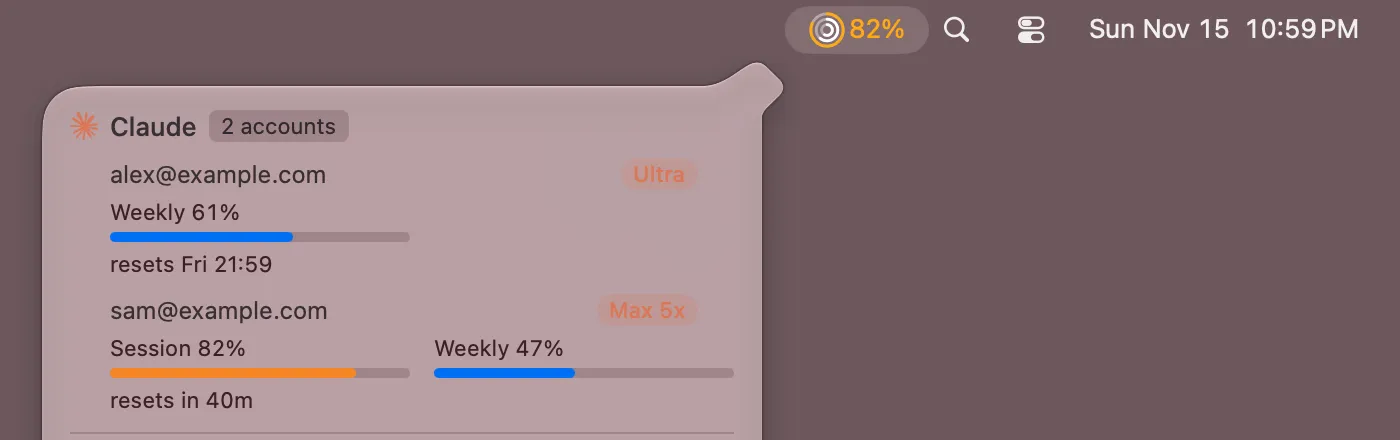
There’s a notification at 80%, 90% and 100% too, so I can switch accounts before an agent stops.
One Click to Start Working
Knowing which account has the most left is only half the job. Clicking an account’s row opens its CLI in my terminal, signed in as that account, with permission prompts off: claude --dangerously-skip-permissions with the right config folder, codex --yolo with the right Codex home, and the same for agy, copilot and amp.
The Morning After
On Sunday morning I opened my laptop and the numbers were out of date, and my Claude accounts said they were signed out. I knew they weren’t.
There were two problems. The first was a command that never came back: one of the CLIs hung overnight (most likely amp usage), and because a refresh doesn’t start while another is still running, every refresh after it quietly did nothing. The app now kills a command that runs past its timeout.
The second was Claude. Claude Code’s access token only lasts a few hours, and it’s Claude Code that renews it, when you use it. Leave an account idle overnight and the app is holding an expired token. Renewing it from the app is risky, because the refresh token changes every time it’s used, so if the app and Claude Code renew at the same moment, Claude Code can end up signed out. The app now takes the same refresh locks Claude Code takes, renews only if the token is still expired, and reads the Keychain again just before it saves. None of that is documented. It copies what Claude Code 2.1 does, so a Claude Code update could break it.
And Now Windows
Some of my fellow maintainers don’t have Macs, so since Monday AI Usage has a Windows version too.
It’s a native Windows 11 app that lives in the system tray, and it works the same way. It finds the accounts already signed in on the PC by itself and shows them in the same order, with the same limits and notifications. The tray icon draws the same three rings, although Windows doesn’t show text beside a tray icon, so the percentage is in its tooltip. Clicking an account opens its CLI in a new Windows Terminal tab, with the same flags as on the Mac, and if that CLI isn’t installed it offers to install it.
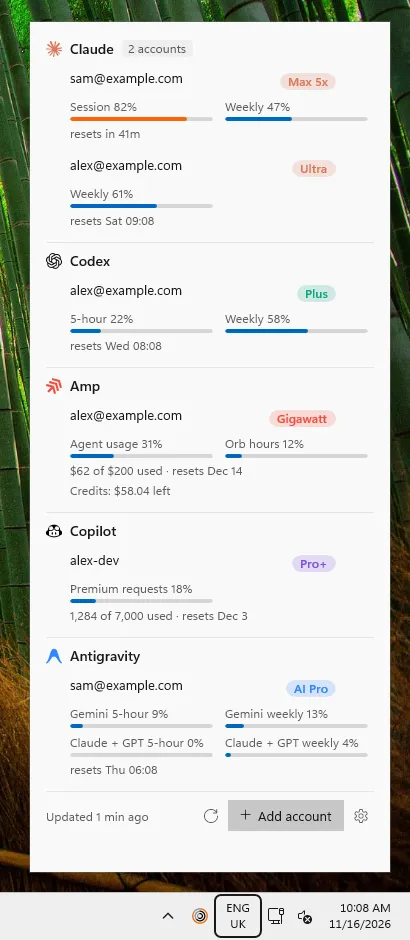
The installer isn’t signed yet, so Windows may say it protected your PC the first time you run it. The download page says how to get past that.
Where It’s Got To
AI Usage has been in my menu bar since Saturday morning, and it’s now the first thing I look at before I start an agent: the rings tell me whether anything is close to running out, and the menu tells me which account has the most left, one click from a terminal.
It’s free to download, for Mac or Windows, for anyone else juggling more than one subscription. Next is an iPhone app with widgets. I’ve picked a design, and I’m still working out how the phone should get its numbers.